 FAQ
FAQTo register a company in Pingshan, use the One-stop Enterprise Setup Platform, operated by the Shenzhen Municipal Market Regulation Bureau.
Watch this English-language video to learn how to use the One-stop Enterprise Setup Platform. Video from Shenzhen Municipal Market Regulation Bureau
Quick steps:
1. Visit: https://amr.sz.gov.cn/xxgk/qt/ztlm/qykb/
2. Click “办理入口” (Apply now)
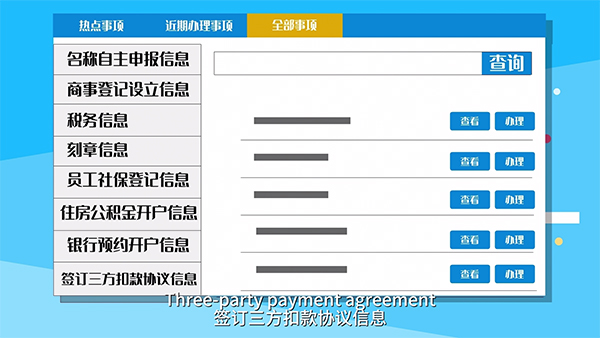
3. Information you will need to prepare:
Business name declaration
Business registration details
Tax information
Seal engraving details
Employee social security registration
Housing fund account setup
Bank account appointment
Three-party payment agreement
Utility setup appointment
If you choose fully online processing:
Download the application, then complete the signing process through video verification, mobile banking, digital certificate, electronic seal, or electronic business license.
If you choose partial online processing:
Select a service center in Shenzhen and a time slot, then submit required materials onsite. (Checklist: https://www.gdzwfw.gov.cn/portal/v3/guide/11440300MB2C9273923440125050001 )
Service window in Pingshan:
Office hours: 9 a.m.-12:30 p.m., 2-5:30 p.m. (Mon.-Fri.)
Tel: +86 755 28477111
Add: Shenzhen Pingshan District Government Service Center, 12 Jinniu West Road, Pingshan District (坪山区金牛西路12号深圳市坪山区政务服务中心)
Metro: Line 14 to Pingshan Square Station (坪山广场站), Exit B, then take a taxi
SkyShuttle: Line 1 to Yanziling Station (燕子岭站), Exit B
After submission
The platform will forward the application to relevant departments for parallel review and processing, and will complete procedures within one day.
Phased processing service:
Entrepreneurs can complete core registration first, then proceed with seal engraving, tax invoice application, employee social security registration, and housing fund registration. All procedures can be handled through the same platform: https://amr.sz.gov.cn/xxgk/qt/ztlm/qykb/ . In the “分时办理” section, click “立即申请” (Apply now) to process these items.
Quick links:
Electronic seal: https://dzyz.sz.gov.cn/ep/front/ca-org-web/index.html#/officialHome
Query system for standard business scope terminology: https://jyfwyun.com/
Digital certificate driver download: https://amr.sz.gov.cn/OnlineUser_WebUI/WebPages/downloadlist.aspx
Electronic business license: https://zzapp.gsxt.gov.cn/#/printlicense
Hotlines:
Tax: +86 12366
Housing fund: +86 12329
Social security: +86 12333
Water: +86 755 82137777
Electricity: +86 755 95598
Gas: +86 755 25199999

ICP Registration Number: 粤ICP备17054870号-1
 Police Registration Number:44031002000124
Website ID: 4403910001
Police Registration Number:44031002000124
Website ID: 4403910001
Government Service Hotline: 0755-12345
Website Technical Support:zwxx@szpsq.gov.cn
Sponsored by: General Office of CPC Pingshan District Committee (General Office of Pingshan District People's Government, Foreign Affairs Office of Pingshan District, and Archives Administration of Pingshan District)



 HOME
HOME PINGSHAN GOVERNMENT
 NEWS
NEWS ABOUT PINGSHAN
 INVEST IN PINGSHAN
 LIFE
LIFE SERVICES
 FAQ
FAQ CHINESE
 FRANÇAIS
 日本語
日本語 한국어
한국어